

How do I change the language and the light or dark theme?
The dashboard opens in Arabic with the dark theme. You can switch the language between Arabic and English, and the theme between dark and light, at any time.
Before you start
Section titled “Before you start”- Role needed: any role.
- Where it is available: web. The sign-in, invitation and reset pages have the language button too, but they have no theme button.
How to get there
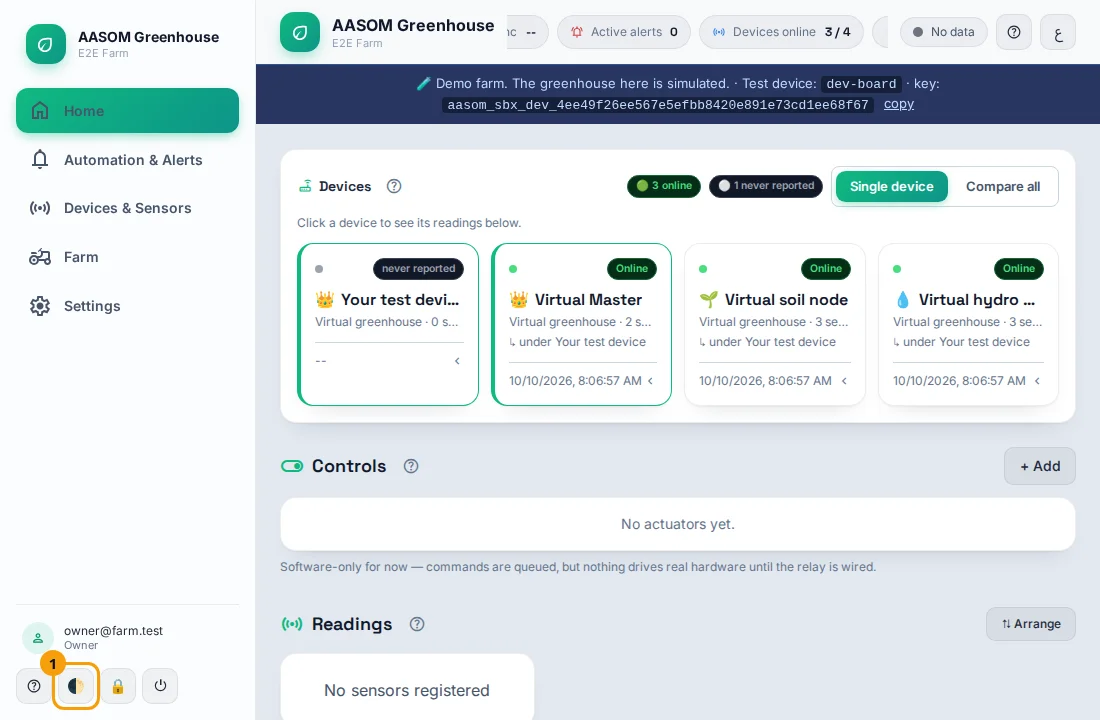
Section titled “How to get there”The language button is at the top of every page. The light/dark button (🌓) is at the bottom of the side menu; on a phone, in the bar at the bottom of the screen.
Change the language
Section titled “Change the language”- Find the small language button at the top of the page. It shows EN while the page is in Arabic, and ع while it is in English.
- Press it. The whole page changes language at once, and the text direction changes with it (right-to-left for Arabic, left-to-right for English).

Change the theme
Section titled “Change the theme”- Find the light / dark button (the half-moon 🌓) next to your email and role. On a computer it is at the bottom of the side menu; on a phone it is in the bar at the bottom of the screen.
- Press it to switch between dark and light.
What happens next
Section titled “What happens next”The choice is remembered in this browser, so the next time you open the dashboard on the same device it keeps your language and theme.
- Messages from the farm, such as error messages, follow the language you chose.
- The choice is per device and browser. Make it again on another phone or computer.
Common problems
Section titled “Common problems”The language went back to Arabic. The browser may have cleared its saved data, or you opened the farm in a different browser. Press the language button again.
Did this article answer your question?
Glad it helped, thank you!