

How do I create the first owner account on a new farm?
A new farm starts with no accounts. The first account created on it becomes the Owner, who can invite everyone else. This article is for that first person.
Before you start
Section titled “Before you start”- Role needed: none. The first account becomes the Owner automatically.
- What you need: your farm link and an email address that you control.
- Where it is available: web.
How to get there
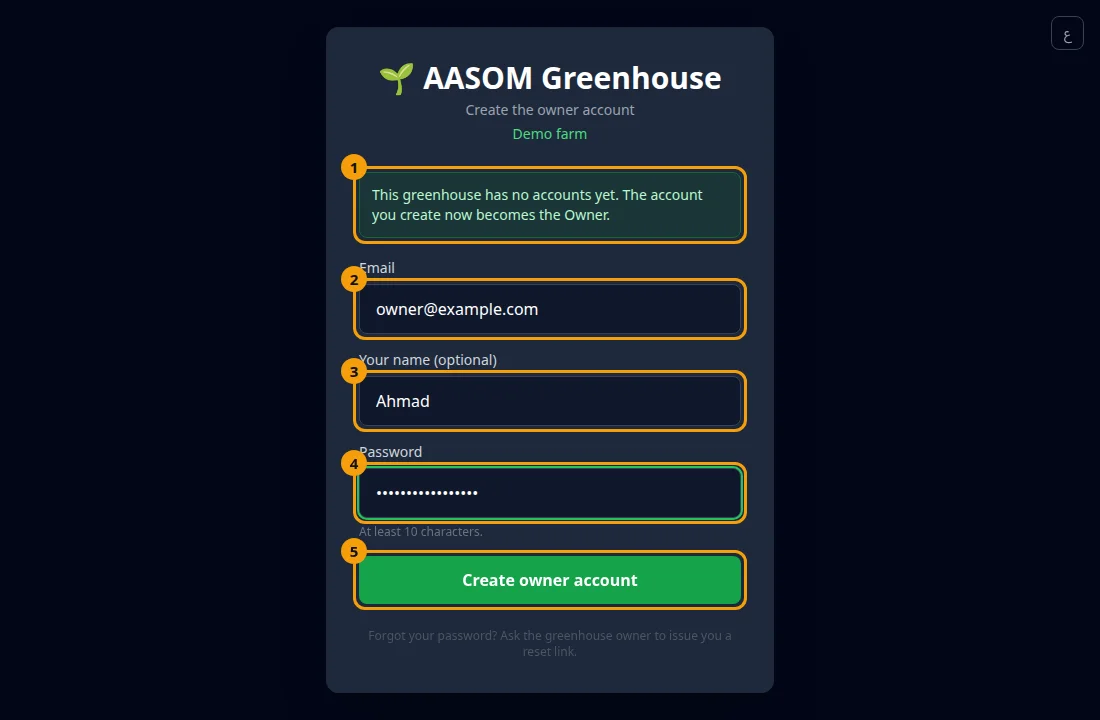
Section titled “How to get there”Open the farm link before anyone has created an account. The page shows Create the owner account by itself. You do not need to look for it in a menu.
- Open your farm link. Instead of the usual sign-in, you see “Create the owner account” and a green note: “This greenhouse has no accounts yet. The account you create now becomes the Owner.”
- Type your email in Email.
- Optionally type your name in Your name (optional).
- Type a password in Password. It must be at least 10 characters.
- Press Create owner account.
What happens next
Section titled “What happens next”The farm dashboard opens and you are signed in as the Owner. From Settings, Users & Access you can invite the rest of the team (see How do I accept an invitation to a farm? for what they will see).
- Do this yourself, on your own device. The first person to reach the page becomes the Owner.
- Choose a strong password and keep it safe. It cannot be recovered by email.
Common problems
Section titled “Common problems”I see the normal sign-in page, not “Create the owner account”. The farm already has accounts. Sign in, or ask the owner for an invitation.
I see “This farm is waiting for its owner”. Open the invitation link you were sent instead.
Glad it helped, thank you!