

How do I read my sensor readings?
The Readings section of Home shows one card per sensor of the device you selected in Devices: temperature, humidity, soil moisture and so on.
Before you start
Section titled “Before you start”- Role needed: any role.
- Where it is available: web.
How to get there
Section titled “How to get there”- Sign in (see How do I sign in to my farm?). Home is the first page you see.
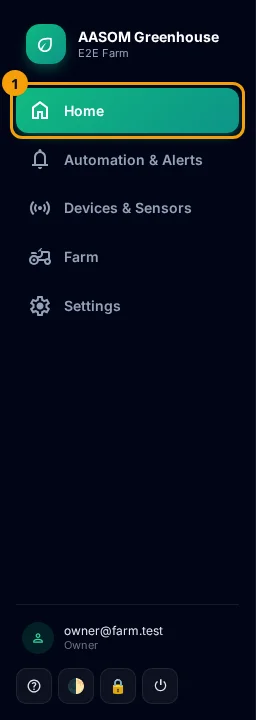
- At any time, press Home in the side menu. On a phone, it is in the bar at the bottom of the screen.
- Select a device in the Devices strip, then scroll down to Readings.
Read a card
Section titled “Read a card”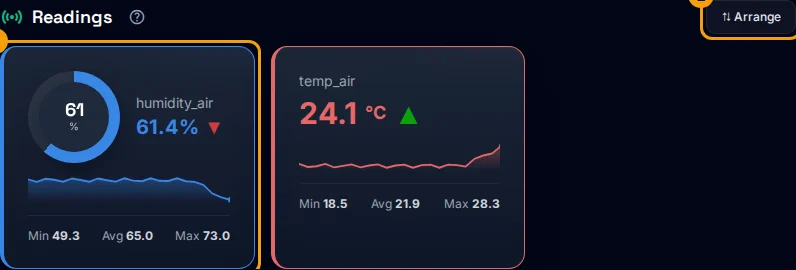
- The big number is the latest value, with its unit. Humidity and soil moisture also appear as a round gauge.
- The arrow next to it compares the last two readings: ▲ rising, ▼ falling, – steady.
- The small line under it is a mini chart of the recent readings.
- Min, Avg, Max at the bottom are the lowest, average and highest values of the period.
- A red warning such as “below 18” or “above 30” appears when the value is outside a limit set in your alert rules. The card gets a red edge, and it is counted in Active alerts in the status bar.
If a device has no sensors yet, you see “No sensors registered”. A value shown as -- means no reading has arrived.
Arrange the cards
Section titled “Arrange the cards”- Press Arrange above the cards.
- Drag a card to move it. Press width to make it wider, or hide to hide it.
- Press Done. To go back to the default layout, press Reset.
Arrange mode looks like this:
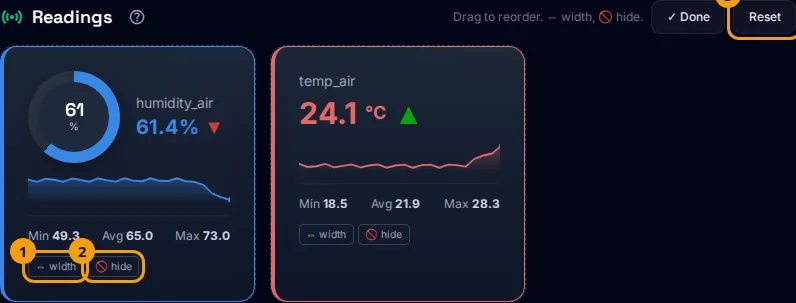
A small note beside the buttons tells you where the layout is kept: “Saved to your account” or “Saved in this browser only”.
- The page updates by itself about every 90 seconds, so you do not need to reload it.
- A hidden card is not deleted. Press Arrange, then show on it.
- Colors are fixed per sensor type, for example red for temperature and blue for humidity.
Common problems
Section titled “Common problems”A card shows --. The sensor has not reported yet. Check the device in the device list.
I do not see a warning although the value looks wrong. Warnings come only from alert rules. Ask an Admin to add a rule with limits for that sensor.
Did this article answer your question?
Glad it helped, thank you!