

How do I read the automation log and see what the rules did?
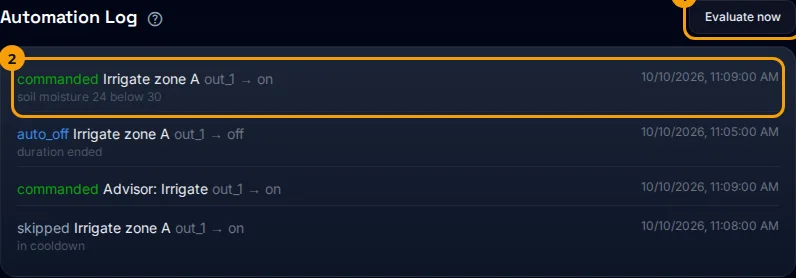
The automation log shows the latest things your rules and the Advisor did to actuators, and why. It is the first place to look when you ask “what opened the valve?” or “why did the rule not run?”.
Before you start
Section titled “Before you start”- Role needed: any role can see the log. The Evaluate now button is for Admins and Owners.
- Where it is available: web.
- The log shows the last 25 events for the whole farm, not for one device.
How to get there
Section titled “How to get there”- Sign in (see How do I sign in to my farm?).
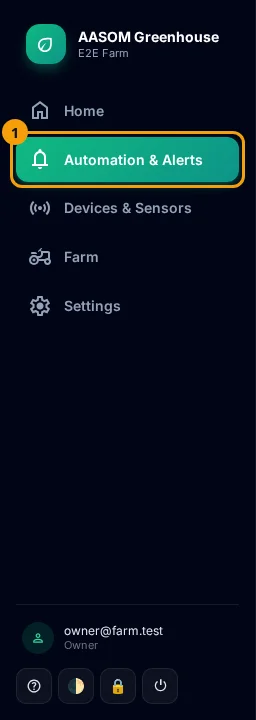
- Press Automation in the side menu. On a phone, it is in the bar at the bottom of the screen.
- Scroll to the bottom of the page, to the “Automation Log” section.
Reading an entry
Section titled “Reading an entry”Each entry has:
- The outcome, in a colour (green, blue, red and grey).
- The rule name. Advisor commands appear as “Advisor: irrigate”, for example.
- The actuator and action, such as
out_1 → on. - A small detail line under it when there is one, giving the reason.
- The time on the right.
What the outcomes mean
Section titled “What the outcomes mean”| Outcome | Meaning |
|---|---|
| Commanded | The command was sent to the actuator |
| Auto off | The run time ended and the off command was sent |
| Failed | The command could not be carried out; the detail says why |
| Skipped | The condition was met but nothing was done on purpose, for example because of the cooldown or a disabled actuator |
The Evaluate now button
Section titled “The Evaluate now button”It asks for the rules to be checked right away instead of waiting for the periodic check (every minute), then refreshes the rules and the log. It is useful after editing a rule, to see its effect.
The top bar
Section titled “The top bar”The bar shows: Active automation rules (enabled / total), Running now (how many rules are holding an actuator at this moment) and Last event (how long ago).
How do I find out why a rule did not run?
Section titled “How do I find out why a rule did not run?”- Look for its name in the log. If you find Skipped, read the detail.
- If you find nothing, check the rule itself in automation rules: is it disabled? Is the time window right?
- Check that the output is set up and enabled in Outputs, and that the device is online (see Device states).
Common problems
Section titled “Common problems”The log is empty: “Nothing has happened yet”. No rule has fired yet. This is normal for a new rule whose condition has not been met.
I see “Failed”. Open the detail. Usually the actuator is disabled or not set up.
I do not see the Evaluate now button. Your role is Viewer.
Glad it helped, thank you!